The aim now lives in the world
“The plane is quite hard to steer and tends to turn on its own.” That was the report, and it was fair. Mouse flying didn't do what your hand told it — it kept wheeling after you stopped, and it never quite sat still on a target. This pass rebuilds it from the ground up, and adds the sensitivity slider low-DPI pilots have been asking for.
What was wrong
The old mouse aim treated every push as “keep turning.” Flick the mouse and let go, and the nose kept swinging well past where you meant to stop — the plane “turning on its own.” Try to hold your guns on a weaving enemy and the aim would never lock; you'd chase it with tiny corrections that never settled, hunting the target instead of holding it. It was hard to steer and impossible to be precise with.
Flick, and it goes exactly there
Now your aim lives out in the world, not stuck to the nose. A flick is a finite order — fly there — and the plane turns exactly that far and stops. You can see it happen: the reticle sticks to a spot in the sky and the nose visibly catches up to it, then holds. Want a hard, sustained turn? Drag to the rim of the steering circle and hold it there — that's a full-performance turn for as long as you want, no endless mouse-dragging to keep it going. Ease the mouse back a hair and the turn ends where you said it would.
Fine aim that actually settles
Laying your guns on a target is a different, calmer job now. Put the reticle on an enemy a few degrees off your nose and the plane slides onto it and locks — captured in about a second and a half, then dead steady, no wander, no see-saw of the wings. It feels like a gun turret swinging onto a bearing rather than a whole airplane wrestling itself. And take your hands off entirely and the plane holds its altitude and flies straight, instead of quietly sinking away.
Your sensitivity, your slider
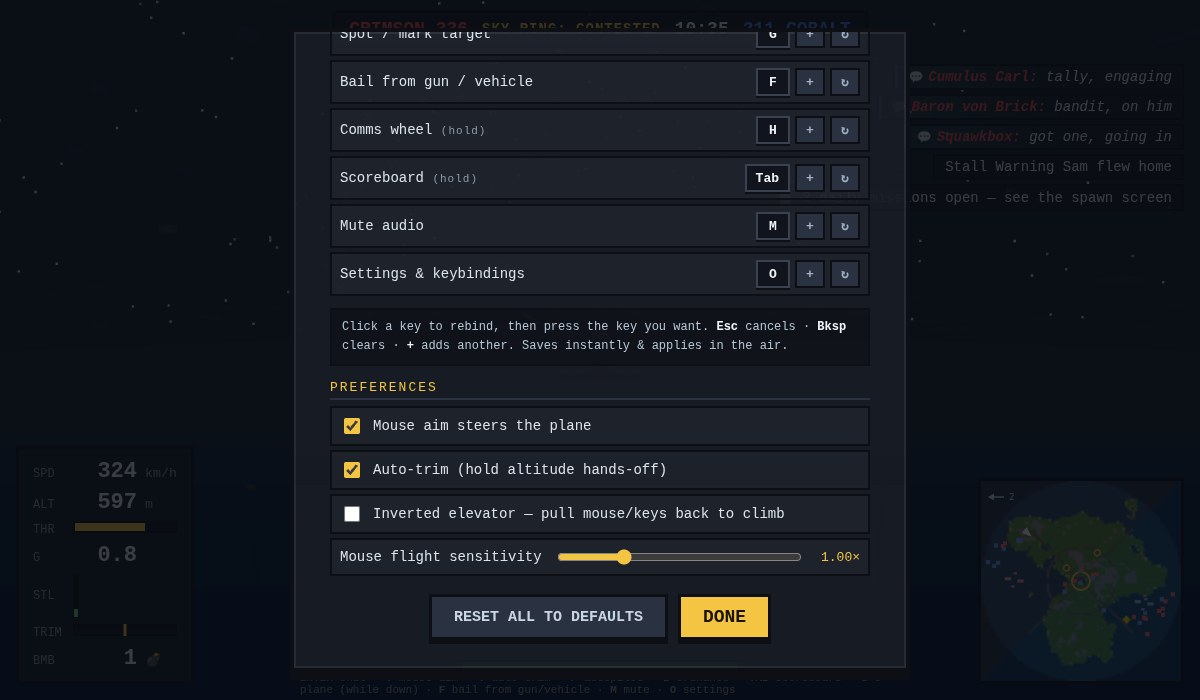
Under Settings → Mouse flight sensitivity there's a new slider, 0.3× to 3×, that takes hold live and remembers where you left it. It scales how far a given flick of the mouse turns the aim (and how far a look-around swings the camera) without ever changing how the airplane itself flies. On a low-DPI mouse, turn it up and a small desk sweep buys a big slice of sky; crank it down for fine, deliberate gun work. Set it once and it's yours.
The keys still win
And if you'd rather just fly it by hand for a moment, your keys outrank the assist: a light tap trims gently on top of the aim, but commit to a roll and the airplane is yours — no more arm-wrestling the helper for control of your own wings.